http://www.pythonchallenge.com/
Can you figure out the first level?
o_O
Thursday, April 10, 2014

Wednesday, April 9, 2014
Warm Up 4/9 - So About those 3-Dee Printers...
 So check out this breaking news this morning
A new 3D Printer seems to be getting a lot of traction on Kickstarter.
Check this article out, then I want you to do some research on this "Micro"
Specs? Price? Release Date? tell me what we know about it so far...
First, search for 'uses' for a 3D printer. Yes I know, we have all heard that you can 3D print a gun (mostly) but what other, practical uses are there? Can you find interesting examples of people who have used them to make things for sale?
Then, I would like to see how resourceful you are. I would like to see if you can find a person, or a website that has written reviews for 3D Printers. Which ones are the best? What is the best price/quality you can buy? Consider printers for 'home' vs industrial use.
So here it is: I want to convince the school, to buy a 3D printer for next year.
Your Goal: Write a proposal to Parkmont.
- Why would it be good to have a 3D printer. What could students learn, what activities or classes would having one allow us to do?
- What would be the best one to buy? Discuss prices, models, and give your top 3 recommendations.
Tuesday, April 8, 2014
HW 23 - Cyborgs are REAL
We watched the TED talk in class today. I am going to post several links about the topic, but this is no joke. Neil Harbisson is the worlds first real cyborg.

The Ted Talk
The Wiki on his Foundation
http://www.cyborgfoundation.com/
Tonight, investigate this amazing (but totally real) technology.
Do two things:
- Write 150 words minimum on this technology. Bonus points for finding information about it that we didn't talk about in class
- Get a reaction from a parent or other adult at home: after you did you summary/writeup, explain this story to someone and get a reaction. Write about their reaction in 50 words or more.
Thats 200 words total. 150 on a summary and telling me about the technology. 50 words on a reaction you got when you told someone else that CYBORGS ARE REAL.

The Ted Talk
The Wiki on his Foundation
http://www.cyborgfoundation.com/
Tonight, investigate this amazing (but totally real) technology.
Do two things:
- Write 150 words minimum on this technology. Bonus points for finding information about it that we didn't talk about in class
- Get a reaction from a parent or other adult at home: after you did you summary/writeup, explain this story to someone and get a reaction. Write about their reaction in 50 words or more.
Thats 200 words total. 150 on a summary and telling me about the technology. 50 words on a reaction you got when you told someone else that CYBORGS ARE REAL.
Warm Up #2 4/8 - Random, yet all-important Tech News
Lets go over each one of these articles and have a class discussion.
For each one, we will read together as a class, ask questions, and watch the associated videos:
RIP Windows XP
To Listen Without Consent – Abusing the HTML5 Speech
Charge your phone in 30 Seconds!
The 3D Printed Tattoo?!?!?
With Robotic Walking Suit, Paralyzed Person Will Give World Cup's First Kick
How awesome is technology.
Woa o_O
For each one, we will read together as a class, ask questions, and watch the associated videos:
RIP Windows XP
To Listen Without Consent – Abusing the HTML5 Speech
Charge your phone in 30 Seconds!
The 3D Printed Tattoo?!?!?
With Robotic Walking Suit, Paralyzed Person Will Give World Cup's First Kick
How awesome is technology.
Woa o_O
Warm Up 4/8 - Start with Lightbot -- then a cool video -- then some more stuff!
Go Go Go!!!!
Code!!!!!!!
o_O
Code!!!!!!!
o_O
Monday, April 7, 2014
HW 22 - Use Break and Continue on FavDay.py
Starting on page 84 in our Chapter 8, read about using the two commands 'break' and 'continue' and how they can be used to change the flow.
Download my "Fav Day.py" program out of the examples folder on Drive.
Change the code so it does two different things, separately (each one of these can be a separate program):
- When you get to your favorite day, the loop stops. [the last thing it prints is your favorite day]
- It SKIPS printing your favorite day
Call it FavDayA.py and FavDayB.py
Good luck!
Download my "Fav Day.py" program out of the examples folder on Drive.
Change the code so it does two different things, separately (each one of these can be a separate program):
- When you get to your favorite day, the loop stops. [the last thing it prints is your favorite day]
- It SKIPS printing your favorite day
Call it FavDayA.py and FavDayB.py
Good luck!
Warm Up 4/7 - The Geography of Data
After adding a few things to our folders, we will read the warm up together to start:
For today's warm up, you will be doing an activity in pairs, to read in to and digest an information map.

We are going to start by browsing on your own at the Information Geographies at the Oxford Internet Institute
Part 1) Browse - and pick out three maps that interest you.
- Some of the maps are more visually attractive to some than others, but let's pick the most interesting content based on what it is showing. See if you start to pick out some of the basics and most important pieces of information even before getting to discuss as a group
Part 2) Group Discussion - tell the group which ones caught your eye, and why
- Each person should be ready to talk about at least one. You should be ready to give us maybe one or two things you noticed.
Part 3) Power Pair Presentations - partner up with someone who is also interested in your map.
- Explain it to us! Make a power point along with your partner (share the google presentation so you can both work on it at the same time!)
- Use screenshots to illustrate particular places on the map you want to talk about
- Goal: use the write-up they present us to highlight important things the map shows us about our world culture.
Last week of the session...lets finish strong!

We are going to start by browsing on your own at the Information Geographies at the Oxford Internet Institute
Part 1) Browse - and pick out three maps that interest you.
- Some of the maps are more visually attractive to some than others, but let's pick the most interesting content based on what it is showing. See if you start to pick out some of the basics and most important pieces of information even before getting to discuss as a group
Part 2) Group Discussion - tell the group which ones caught your eye, and why
- Each person should be ready to talk about at least one. You should be ready to give us maybe one or two things you noticed.
Part 3) Power Pair Presentations - partner up with someone who is also interested in your map.
- Explain it to us! Make a power point along with your partner (share the google presentation so you can both work on it at the same time!)
- Use screenshots to illustrate particular places on the map you want to talk about
- Goal: use the write-up they present us to highlight important things the map shows us about our world culture.
Last week of the session...lets finish strong!
Friday, April 4, 2014
HW 21 - Times Table.py
Homework for this weekend is TryItOut number 1 from chapter 8
You need to write a program that produces a times table of the user's choice.
get an input and store in a variable (as a string) -- call it "n"
use a for loop to loop "i" from 1 up to 10 (or 12):
each time, print a statement of "n" times "i" = (n*i)
it should LOOK very similar to, when the user picks 5:
Which multiplication table would you like?
5
Here's your table:
5 x 1 = 5
5 x 2 = 10
5 x 3 = 15
5 x 4 = 20
5 x 5 = 25
5 x 6 = 30
5 x 7 = 35
5 x 8 = 40
5 x 9 = 45
5 x 10 = 50
Good Luck!!!
You need to write a program that produces a times table of the user's choice.
get an input and store in a variable (as a string) -- call it "n"
use a for loop to loop "i" from 1 up to 10 (or 12):
each time, print a statement of "n" times "i" = (n*i)
it should LOOK very similar to, when the user picks 5:
Which multiplication table would you like?
5
Here's your table:
5 x 1 = 5
5 x 2 = 10
5 x 3 = 15
5 x 4 = 20
5 x 5 = 25
5 x 6 = 30
5 x 7 = 35
5 x 8 = 40
5 x 9 = 45
5 x 10 = 50
Good Luck!!!
Thursday, April 3, 2014
HW 20 - For and If - Ice Cream.py
Tonight, you need to code the following situation:
You go to an ice creme parlor, and are presented with 10 flavors. Some of the flavors you like, and some you don't. (You can decide the flavors, and the ones you like).
Write a program that will iterate over a list of all of the flavors.
Inside your loop, use an IF statement to tell if you like the flavor or not.
Your output should look something like this:
Chocolate - I like it
Vanilla - I don't like it
Strawberry - I don't like it
Mint - I like it
Mint Chip - I like it
You go to an ice creme parlor, and are presented with 10 flavors. Some of the flavors you like, and some you don't. (You can decide the flavors, and the ones you like).
Write a program that will iterate over a list of all of the flavors.
Inside your loop, use an IF statement to tell if you like the flavor or not.
Your output should look something like this:
Chocolate - I like it
Vanilla - I don't like it
Strawberry - I don't like it
Mint - I like it
Mint Chip - I like it
Warm Up 4/3 - Pick a Tech Story
So today, you get some control over what you read this morning:
The Washington Post has a blog called "The Switch" and every week they make a 'switchboard' post where they highlight 5 top tech news stories of the week.
In your Warm Up doc, your goal this morning:
- Read and summarize two of the articles
- The first should be the 'Cuban Twitter' story which just broke today
- You can pick any of the other four articles to do as your second story
Each summary should be at least 100 words, preferably more
We have a Learnstreet.com activity to tackle in the first half, and the second half will be dedicated to studying more loop structures.
Good luck!
The Washington Post has a blog called "The Switch" and every week they make a 'switchboard' post where they highlight 5 top tech news stories of the week.
 |
| Here is the link directly to the blog |
- Read and summarize two of the articles
- The first should be the 'Cuban Twitter' story which just broke today
- You can pick any of the other four articles to do as your second story
Each summary should be at least 100 words, preferably more
We have a Learnstreet.com activity to tackle in the first half, and the second half will be dedicated to studying more loop structures.
Good luck!
Wednesday, April 2, 2014
HW 19 - Make a new "For" Loop program
 Practice what we started today.
Take a fresh look at Chapter 8 -- read over the first three pages.
Use the examples to make a program that uses three for loops anywhere in the code.
A requirement, is that at least one of the loops should do something different each iteration
Also, in your comments, define the word "iteration" (hint: look for the word in the textbook =)
Warm Up 4/2 - Facebook Drones, and the "15 Minute Short Story Challenge"
This morning, we will read a news story together, about how the massive FB has an idea to use "drones"...
Here is what we are going to do:
- Read the article and discuss briefly. [Implications?]

- I give you 3 minutes to search and find another current story on drone technology (try doing a search on 'drone technology' on the Google News search)
- Challenge: Write for 15 minutes to write your own short fiction, about a utopia or a dystopia where drone technology has taken over.
We will do some practicing of If-statements today, and might start on learning about loops in the second half
So without further ado, here is the article.
.
Here is what we are going to do:
- Read the article and discuss briefly. [Implications?]

- I give you 3 minutes to search and find another current story on drone technology (try doing a search on 'drone technology' on the Google News search)
- Challenge: Write for 15 minutes to write your own short fiction, about a utopia or a dystopia where drone technology has taken over.
We will do some practicing of If-statements today, and might start on learning about loops in the second half
So without further ado, here is the article.
.
Tuesday, April 1, 2014
Warm Up 4/1 - The Internet Today
All joking aside. Google made a huge announcement today, which we will watch on the big screen.
 It is hard to keep companies serious on a day like today, as April's Fools Day approaches, a lot starts to pop up online that can be misleading. Read about some of the top pranks from this week on the Washington Post (You will want your headphones for a few of them)
Interested more in the all-time best? Check this list out of two of the biggest internet prank jokers out there.
Warm Up Doc?
Make a ranking, what are the best internet pranks of all time.
After a short-ish warm up time, we will present some HOTI projects from the weekend.
 It is hard to keep companies serious on a day like today, as April's Fools Day approaches, a lot starts to pop up online that can be misleading. Read about some of the top pranks from this week on the Washington Post (You will want your headphones for a few of them)
Interested more in the all-time best? Check this list out of two of the biggest internet prank jokers out there.
Warm Up Doc?
Make a ranking, what are the best internet pranks of all time.
After a short-ish warm up time, we will present some HOTI projects from the weekend.
Monday, March 31, 2014
HW 18 - Ch 7 Try It Out 1+2.py
In the Chapter 7 of your textbook. Homework tonight is the Try It Out problems numbers 1 and 2.
Good Luck!
o_O
Warm Up 3/31 - Rise of the Robots
This morning, we are going to read an article as a class, then watch part of a related TED talk:
To start, do these two things:
 - Get your folders and add the most recent homework.
- Open a blank document for your warm up
This is the article we are going to read. You can start reading it now, but in a few minutes, we will read it aloud as a class: Rise of the Robots.
As a class, we take turns reading each paragraph, so if you would like to preview the content, now is a great time.
If you are interested, this is a more in-depth perspective on the same issue, also from economist.com. You can read a little further about the aspect of small vs large businesses.
To start, do these two things:

- Open a blank document for your warm up
This is the article we are going to read. You can start reading it now, but in a few minutes, we will read it aloud as a class: Rise of the Robots.
As a class, we take turns reading each paragraph, so if you would like to preview the content, now is a great time.
If you are interested, this is a more in-depth perspective on the same issue, also from economist.com. You can read a little further about the aspect of small vs large businesses.
Friday, March 28, 2014
HW 18 - HOTI 2000's
Using The History of the Internet in a Nutshell (part 4) you are going to use your research from today to make a power point presentation on one of the major internet steps.
Jackson - Web 2.0
Yann - VoIP
Omar - SETI
Nathan - SETI
Elise - Dotcom collapse (2008 bubble)
Amanda - Internet Election of 2008
Shavar - Twitter (and the Arab Spring)
Charles - SoBig Worm
You need to use your researched information, and make a Google Presentation that at the minimum, answers the following questions:
1) What was the name of your milestone/invention, and what did it do?
2) Who came up with the idea? (person, University, company, etc) and a little background about them, including the where they worked, lived.
3) Why did they come up with it? AKA What problem or goal were they trying to solve.
4) How did it change the internet? What 'idea' or concept was important that we still use today.
Minimum number of slides: 5
Maximum number of slides: 8
Jackson - Web 2.0
Yann - VoIP
Omar - SETI
Nathan - SETI
Elise - Dotcom collapse (2008 bubble)
Amanda - Internet Election of 2008
Shavar - Twitter (and the Arab Spring)
Charles - SoBig Worm
You need to use your researched information, and make a Google Presentation that at the minimum, answers the following questions:
1) What was the name of your milestone/invention, and what did it do?
2) Who came up with the idea? (person, University, company, etc) and a little background about them, including the where they worked, lived.
3) Why did they come up with it? AKA What problem or goal were they trying to solve.
4) How did it change the internet? What 'idea' or concept was important that we still use today.
Minimum number of slides: 5
Maximum number of slides: 8
Warm Up 3/28 - It's Friday, lets play a little Light Bot
You know the link, on the right side of the blog.
 Has anyone got to the end of the HOC version? If so, let me know and I will post the classic version, which had some different levels (and I think it's harder?)
In first half, we will do History of the Internet, and in the second half will be doing more programming using decisions and controlling program flow.
8^|)
Edit: if you look on the right side in the important websites on the right, I added the "Classic" version. Apologies for the 30 second ad in front of it.

In first half, we will do History of the Internet, and in the second half will be doing more programming using decisions and controlling program flow.
8^|)
Edit: if you look on the right side in the important websites on the right, I added the "Classic" version. Apologies for the 30 second ad in front of it.
Thursday, March 27, 2014
HW 17 - Decision Program from Home.py
Make a program that uses decisions (If statements) to change the flow of the program. Here are some requirements:
- You must get input from the user.
- You must have more than one if statement.
- You must use more than one comparison operator (==, !=, <, and > were discussed today)
- You must COMMENT your code with your name, assignment and date at the top of your file
Idea: write a program from scratch that test's if a number is negative or not.
Good luck!
- You must get input from the user.
- You must have more than one if statement.
- You must use more than one comparison operator (==, !=, <, and > were discussed today)
- You must COMMENT your code with your name, assignment and date at the top of your file
Idea: write a program from scratch that test's if a number is negative or not.
Good luck!
Warm 27 Up - Facebook + Oculus Rift = $$$ ?
Did we mention it was happening yesterday? The big buyout!
Well huge news today, Facebook purchased the very company we have been discussing: Oculus Rift.
Before we get in to this, Oculus Rift started as a KICKSTARTER proposal.
What is Kickstarter? Find an example of a current proposal:
https://www.kickstarter.com

So I am going to provide a few articles to look at, but you don't have to limit yourself to just these:
Basics of what went down
Facebook's Hardware Land-Grab
Why Would FB buy OR?
How Early Supporters Feel
A particular person's reaction...
What to write? As you read each article, pick out some facts that you think are important. I will ask you some questions when we discuss, having the answers to these questions at least would be a great starting goal:
- how much was the purchase for? How are they planning to use OR? What happened in the stock market? What was the reaction of the public? How do the original supporters feel about this?
- Then predict: will this be a success story or not. Could OR die out because of the FB purchase? Will FB figure out how to use it so effectively we all end up having one? Something in-between?
Extra time? Check out a list of the top 10 Facebook Purchases. Pick two of them, and tell me why you think Facebook purchased them
Well huge news today, Facebook purchased the very company we have been discussing: Oculus Rift.
Before we get in to this, Oculus Rift started as a KICKSTARTER proposal.
What is Kickstarter? Find an example of a current proposal:
https://www.kickstarter.com

So I am going to provide a few articles to look at, but you don't have to limit yourself to just these:
Basics of what went down
Facebook's Hardware Land-Grab
Why Would FB buy OR?
How Early Supporters Feel
A particular person's reaction...
What to write? As you read each article, pick out some facts that you think are important. I will ask you some questions when we discuss, having the answers to these questions at least would be a great starting goal:
- how much was the purchase for? How are they planning to use OR? What happened in the stock market? What was the reaction of the public? How do the original supporters feel about this?
- Then predict: will this be a success story or not. Could OR die out because of the FB purchase? Will FB figure out how to use it so effectively we all end up having one? Something in-between?
Extra time? Check out a list of the top 10 Facebook Purchases. Pick two of them, and tell me why you think Facebook purchased them
Wednesday, March 26, 2014
No New HW Tonight 3/26
Just officially, I said this in class but I need to post it on the blog.
AA forms tomorrow, so if you are missing any assignments tonight is a great chance to catch up.
<:-O
AA forms tomorrow, so if you are missing any assignments tonight is a great chance to catch up.
<:-O
Warm Up 3/26 - Tech News!
Your assignment, is to report the news of technology!
>>> print("Please read all of the requirements below!")
Below, I will give you a nice hefty collection of news sources for things 'tech'. Your job today is simple:
- Find more than one article reporting on the same tech news story
- Write your own version of that news story, in your own words.
- Finish by writing three questions that you have after writing the summary, and I will do my best to answer them
How to Tackle this:
- Find one article that interests you in particular.
- Read the first several paragraphs to get a good idea of what the story is about
- then, go search for another article on that same topic. (For this, I recommend using the Google News search)
- read a second article on the same topic
- now that you have multiple perspectives on the same story, you can start deciding what is important
- begin writing your summary
Things to consider:
- You should aim to have your story be a minimum of 150 words
- I will allow one direct quotation, but that doesn't count towards your word count
- A GOOD news story should always give the who, what, where, why, when, and how. Leaving any of those out requires special consideration.
Sources - use any/all of these, or find your own:
http://www.washingtonpost.com/business/technology/
 http://www.cnet.com/news/
http://www.wired.com/
http://www.cnn.com/TECH/
http://techcrunch.com/
http://www.engadget.com/
http://www.bbc.com/news/technology/
http://www.zdnet.com/
http://www.extremetech.com/
http://gizmodo.com/
by the way, there are way more...
Go forth my young tech reporters!
:-O
>>> print("Please read all of the requirements below!")
Below, I will give you a nice hefty collection of news sources for things 'tech'. Your job today is simple:
- Find more than one article reporting on the same tech news story
- Write your own version of that news story, in your own words.
- Finish by writing three questions that you have after writing the summary, and I will do my best to answer them
How to Tackle this:
- Find one article that interests you in particular.
- Read the first several paragraphs to get a good idea of what the story is about
- then, go search for another article on that same topic. (For this, I recommend using the Google News search)
- read a second article on the same topic
- now that you have multiple perspectives on the same story, you can start deciding what is important
- begin writing your summary
Things to consider:
- You should aim to have your story be a minimum of 150 words
- I will allow one direct quotation, but that doesn't count towards your word count
- A GOOD news story should always give the who, what, where, why, when, and how. Leaving any of those out requires special consideration.
Sources - use any/all of these, or find your own:
http://www.washingtonpost.com/business/technology/
 http://www.cnet.com/news/
http://www.wired.com/
http://www.cnn.com/TECH/
http://techcrunch.com/
http://www.engadget.com/
http://www.bbc.com/news/technology/
http://www.zdnet.com/
http://www.extremetech.com/
http://gizmodo.com/
by the way, there are way more...
Go forth my young tech reporters!
:-O
Tuesday, March 25, 2014
HW 16 - Ch 6 Try It Out #2.py
Tonight, you only have to do the second problem in the Chapter 6 Try It Out:
Write a program that asks for your name, then house number, then street, then city,
then province/territory/state, then postal/zip code (all in EasyGui dialog boxes).
The program should then display a mailing-style full address that looks something
like this:
John Snead
28 Main Street
Akron, Ohio
12345

The problem does not specify that your output needs to also be in a dialog box....but let's see who want's to take on the challenge)
(HINT: You will probably want to use about 5 easygui.enterbox's to gather all of the data. )
Write a program that asks for your name, then house number, then street, then city,
then province/territory/state, then postal/zip code (all in EasyGui dialog boxes).
The program should then display a mailing-style full address that looks something
like this:
John Snead
28 Main Street
Akron, Ohio
12345
The problem does not specify that your output needs to also be in a dialog box....but let's see who want's to take on the challenge)
(HINT: You will probably want to use about 5 easygui.enterbox's to gather all of the data. )
Warm Up 3/25 - Let's Talk Hardware
Over the next few days, lets start talking about the physical hardware that makes up a computer.
We are going to start today with an overview of the different parts of a computer, the over the next few days we are going to take a couple of them apart!

You warm up today will require you to write three parts:
Let's start with this LifeHacker.com article. It is a part 1 of "how to build a computer".
(Feel free to do a quick search of other websites telling you about important computer 'parts' or 'hardware' or 'components'. This one is also pretty useful if you want to get a little more technical.)
Part 1) You are going to start by identifying all of the different major components of a modern PC (or Mac for that matter). Make a list, and include a brief explanation in your own words of what each major component does [ Bonus: Pick out two other components from this list, and quickly research what they are]
Part 2) (Quick) Different Types of Computers - check this brief slideshow, and tell me two things you learned about the names/types of computers.
Part 3) Find some awesome/amazing/extreme/crazy computer builds. The great thing about building PC's is that you can customize it so much, and if you are willing, can do some amazing and crazy things with them!
Check out these articles, each one is a collection of PC's that go well beyond what we normally have in our home. Look through them, and tell me about which one is the coolest in your warm up
Crazy Case Mods
Insane Desktops
20 Most Amazing Computers Ever Made
If you want to find more, do a search of your own using one of those awesome adjectives!
Finished?! Go here: http://www.extremetech.com/tag/computer-building and just click around. See what is hot right now!
We will be sharing a lot of this, and having a group discussions about it. This will lead us in to tomorrow...
=)
We are going to start today with an overview of the different parts of a computer, the over the next few days we are going to take a couple of them apart!

You warm up today will require you to write three parts:
Let's start with this LifeHacker.com article. It is a part 1 of "how to build a computer".
(Feel free to do a quick search of other websites telling you about important computer 'parts' or 'hardware' or 'components'. This one is also pretty useful if you want to get a little more technical.)
Part 1) You are going to start by identifying all of the different major components of a modern PC (or Mac for that matter). Make a list, and include a brief explanation in your own words of what each major component does [ Bonus: Pick out two other components from this list, and quickly research what they are]
Part 2) (Quick) Different Types of Computers - check this brief slideshow, and tell me two things you learned about the names/types of computers.
Part 3) Find some awesome/amazing/extreme/crazy computer builds. The great thing about building PC's is that you can customize it so much, and if you are willing, can do some amazing and crazy things with them!
Check out these articles, each one is a collection of PC's that go well beyond what we normally have in our home. Look through them, and tell me about which one is the coolest in your warm up
Crazy Case Mods
Insane Desktops
20 Most Amazing Computers Ever Made
If you want to find more, do a search of your own using one of those awesome adjectives!
Finished?! Go here: http://www.extremetech.com/tag/computer-building and just click around. See what is hot right now!
We will be sharing a lot of this, and having a group discussions about it. This will lead us in to tomorrow...
=)
Monday, March 24, 2014
HW 15 - Install EasyGui.py and Make a GUI Program
So tonight, a two part-er.

Part 1: Install Easygui.py on your home Python
- Download easygui.py from our drive folder. Save it to your desktop for easy access.
- In Windows: move the file to the C:\Python33 folder
- For our Mac OSX users out there, I am having trouble finding a set of instructions that makes it easy to install easygui, so for this homework (only) you might want to work on this in study hall.
Part2: Make a GUI program.
- You need to make a program that uses at least one of the following boxes in it's code:
buttonbox
choicebox
msgbox
AND ONE OTHER type of box, any type you want
Make SURE you are changing the MSG, the Title, and the choices in the boxes
How do you remember how to use these functions?
- Start Here: http://www.ferg.org/easygui/tutorial.html
- Find the "box" you want to use, click it, and click it again to see a good example
Good luck my peeps ( :-o )
Part 1: Install Easygui.py on your home Python
- Download easygui.py from our drive folder. Save it to your desktop for easy access.
- In Windows: move the file to the C:\Python33 folder
- For our Mac OSX users out there, I am having trouble finding a set of instructions that makes it easy to install easygui, so for this homework (only) you might want to work on this in study hall.
Part2: Make a GUI program.
- You need to make a program that uses at least one of the following boxes in it's code:
buttonbox
choicebox
msgbox
AND ONE OTHER type of box, any type you want
Make SURE you are changing the MSG, the Title, and the choices in the boxes
How do you remember how to use these functions?
- Start Here: http://www.ferg.org/easygui/tutorial.html
- Find the "box" you want to use, click it, and click it again to see a good example
Good luck my peeps ( :-o )
Warm Up 3/24 - Robots can do things fast...
So, a robot sets a world record. Shocking?!? Maybe 40 years ago it was, but I think we have been getting used to it lately!
Take out your headphones, you will want them for this morning.
The story starts with a news article: CubeStormer 3 solves a Rubik's Cube in 3.253 seconds, beating its own robot predecessor CubeStormer 2. Take a moment to read the article briefly, then we will watch the video as a group on the big screen together.
Ok, so here is the challenge for you as a warm up: Use your amazing searching skills:
 Find videos or evidence of Robot's breaking records or otherwise doing things so fast humans have no chance of ever catching them!
Each student will get to suggest a clip on YouTube for us to watch and discuss.
After the warm up, we will be presenting our weekend homework...hope you did it! =O
Take out your headphones, you will want them for this morning.
The story starts with a news article: CubeStormer 3 solves a Rubik's Cube in 3.253 seconds, beating its own robot predecessor CubeStormer 2. Take a moment to read the article briefly, then we will watch the video as a group on the big screen together.
Ok, so here is the challenge for you as a warm up: Use your amazing searching skills:
 Find videos or evidence of Robot's breaking records or otherwise doing things so fast humans have no chance of ever catching them!
Each student will get to suggest a clip on YouTube for us to watch and discuss.
After the warm up, we will be presenting our weekend homework...hope you did it! =O
Friday, March 21, 2014
Extra Fun - The Way Back Machine!
This website lets you look at any webpage from a long time ago:

http://archive.org/web/
This could be a pretty cool tool to use for some of your research...
=)

http://archive.org/web/
This could be a pretty cool tool to use for some of your research...
=)
HW 14 - HOTI 1990's
Using The History of the Internet in a Nutshell (part 3) you are going to use your research from today to make a power point presentation on one of the major internet steps.
Elise - the webcam
Jackson - Hotmail
Yann - MP3 file
Amanda - The first web page
Nathan - start of eBay/Amazon (in 1995)
Omar - .gov
Shavar - Proposal for the World Wide Web
Charles - you can pick one of these of my suggestions to research:
a) "The World" - the first internet provider you could buy
b) The three acronyms HTML, HTTP and URL
c) Mosaic - the first graphical web browser
You need to use your researched information, and make a Google Presentation that at the minimum, answers the following questions:
1) What was the name of your milestone/invention, and what did it do?
2) Who came up with the idea? (person, University, company, etc) and a little background about them, including the where they worked, lived.
3) Why did they come up with it? AKA What problem or goal were they trying to solve.
4) How did it change the internet? What 'idea' or concept was important that we still use today.
Minimum number of slides: 5
Maximum number of slides: 8
Elise - the webcam
Jackson - Hotmail
Yann - MP3 file
Amanda - The first web page
Nathan - start of eBay/Amazon (in 1995)
Omar - .gov
Shavar - Proposal for the World Wide Web
Charles - you can pick one of these of my suggestions to research:
a) "The World" - the first internet provider you could buy
b) The three acronyms HTML, HTTP and URL
c) Mosaic - the first graphical web browser
You need to use your researched information, and make a Google Presentation that at the minimum, answers the following questions:
1) What was the name of your milestone/invention, and what did it do?
2) Who came up with the idea? (person, University, company, etc) and a little background about them, including the where they worked, lived.
3) Why did they come up with it? AKA What problem or goal were they trying to solve.
4) How did it change the internet? What 'idea' or concept was important that we still use today.
Minimum number of slides: 5
Maximum number of slides: 8
Warm Up 3/21 - Find the Definition of a Word, then play a game!
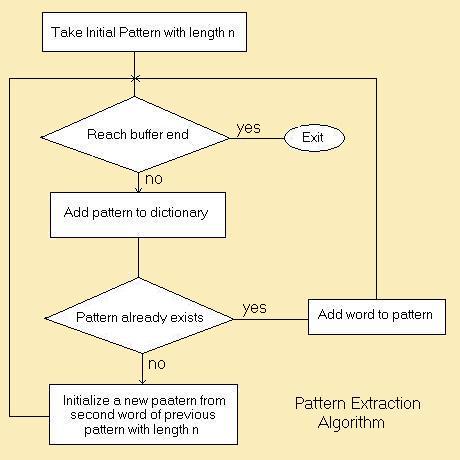
"Algorithm" - what does it mean?
a) Find three different definitions from the web (and you must be able to understand at least one)
b) Tell me an example of an algorithm in real life.
Once you've done that?
LIGHT BOT!!! (see the new link on the right hand menu)
Thursday, March 20, 2014
HW 13 - Ch 5 TryItOut.py
 |
| What type() of input is this?!?! |
Chapter 5 Try It Out presents you with 5 different challenges. You should though, write all of your answers in one .py file.
;-o
Warm Up 3/20 - The most interesting Tech article I have read all year... (Part 2)
...I am willing to bet no one figured it out.

...did anyone notice what author wrote the article???
Here is the article, written about the article you just read.
So, tell me in your write-up why this is so groundbreaking.
Follow up with some supplemental reading on this issue:
Here
or here
and actually, this isn't the first time this has ever been done...this one was from a few years ago. But wasn't published in a major newspaper.
When you finish, you can have some fun with this:
http://www.cleverbot.com/
:-)

...did anyone notice what author wrote the article???
Here is the article, written about the article you just read.
So, tell me in your write-up why this is so groundbreaking.
Follow up with some supplemental reading on this issue:
Here
or here
and actually, this isn't the first time this has ever been done...this one was from a few years ago. But wasn't published in a major newspaper.
When you finish, you can have some fun with this:
http://www.cleverbot.com/
:-)
Warm Up 3/20 - The most interesting Tech article I have read all year... (Part 1)
The title of this blog is literal. This is absolutely amazing. But I wan't you to write it and see if you can figure out why, in my view, this might be one of the most significant advancements in computer and programming technology.
 (This is a re-published article from the LA Times from 3/17)
http://www.bbc.com/news/world-us-canada-26615047
Write-up? Tell me why you think I am claiming this is significant article when it relates to technology and computers. By the way, I am betting no one figures out the why, so consider this part will be more entertainment when we share...be creative -)
Part 2 coming very soon...
 (This is a re-published article from the LA Times from 3/17)
http://www.bbc.com/news/world-us-canada-26615047
Write-up? Tell me why you think I am claiming this is significant article when it relates to technology and computers. By the way, I am betting no one figures out the why, so consider this part will be more entertainment when we share...be creative -)
Part 2 coming very soon...
Wednesday, March 19, 2014
HW 12 - Input/Output Program
Tonight, write a program that fulfills the three most basic functions of any program. Your program must:

1) Get input from the user
2) Change, or manipulate the data in some way
3) Output (print) to the screen, using the input in some way.
Good programs should be clear for the user (Use print commands to give directions). Make sure you use the # to put comments at the top including your name, assignment and date.

1) Get input from the user
2) Change, or manipulate the data in some way
3) Output (print) to the screen, using the input in some way.
Good programs should be clear for the user (Use print commands to give directions). Make sure you use the # to put comments at the top including your name, assignment and date.
Warm Up 3/19 - Guess Why Google is Getting Sued
 No really..before you click on any links. Write down your guess. Why in the world do you think a group of students is suing the great and ever-powerful Google?
Write your guess in your warm up document as the very first thing.
OK now to find out. Go ahead and read through the article:
Google Sued for Data-Mining Students' Emails
Write a very short summary. Why are they getting sued? Break it down for the simple people like myself.
Next, go over and check out one of my favorite tech-news websites (actually an audio news source) at
All Tech Considered. Peruse around, do a little reading. We will listed to one of the audio clips as a class, the one on Privacy in the Digital Age.
Tuesday, March 18, 2014
HW 11 - Ch4 Test Your Knowledge and Try it Out
Do both of the final sections of Chapter 4. Answer the Test Your Knowledge section AND the Try It Out section.

Both parts should be in ONE python.py file.
Make sure you comment your code, and put your name on the top of your code.
In the morning, you should print your .py file right at the start of class.
Both parts should be in ONE python.py file.
Make sure you comment your code, and put your name on the top of your code.
In the morning, you should print your .py file right at the start of class.
Warm Up 3/18 - Bill Gates on Robots and Lots More
So last Thursday, there was an event called "From Poverty to Prosperity: A Conversation with Bill Gates" right here in Washington DC
Start off by reading what Bill Gates himself says about the future of jobs, and what role computers will play in what you get hired for.
For the last part, you can check out some of the other things he talked about in the Wash DC talk he gave. You will need a pair of headphones for this part of the activity. Head over to the main page of the talk itself, and you are presented with a playlist, broken down in to little segments of his talk by topic.
When everyone is done, whoever has the best writeup will get to choose which clip from the playlist we watch as a class.
Good luck
Start off by reading what Bill Gates himself says about the future of jobs, and what role computers will play in what you get hired for.
Start your write-up by telling me: what is Gates saying about the future of jobs?

If you get done with that, I wonder who can find the most interesting background info about Bill Gates. We all know he founded Microsoft, but can you find three other interesting facts about his past life?
For the last part, you can check out some of the other things he talked about in the Wash DC talk he gave. You will need a pair of headphones for this part of the activity. Head over to the main page of the talk itself, and you are presented with a playlist, broken down in to little segments of his talk by topic.
Pick out a segment, and tell me in your warm-up what Bill Gates is saying in that part of his talk.As an alternate (that is if you don't have headphones) you can use his website http://www.thegatesnotes.com/ and go see if you can find his position on some of these important topics
When everyone is done, whoever has the best writeup will get to choose which clip from the playlist we watch as a class.
Good luck
Friday, March 14, 2014
HW 10 - HOTI 1980's
Using The History of the Internet in a Nutshell (part 2) you are going to use your research from today to make a power point presentation on one of the major internet steps.
 Here are the topic assignments:
Nathan - DNS
Yann - IRC
Amanda - Morris Worm
Elise - AOL
Charles - The Well
Shavar - Emoticon
Omar - TCP/IP
Jackson - Protocol Wars
You need to use your researched information, and make a Google Presentation that at the minimum, answers the following questions:
1) What was the name of your milestone/invention, and what did it do?
2) Who came up with the idea? (person, University, company, etc) and a little background about them, including the where they worked, lived.
3) Why did they come up with it? AKA What problem or goal were they trying to solve.
4) How did it change the internet? What 'idea' or concept was important that we still use today.
Minimum number of slides: 5
Maximum number of slides: 8
Here are the topic assignments:Nathan - DNS
Yann - IRC
Amanda - Morris Worm
Elise - AOL
Charles - The Well
Shavar - Emoticon
Omar - TCP/IP
Jackson - Protocol Wars
You need to use your researched information, and make a Google Presentation that at the minimum, answers the following questions:
1) What was the name of your milestone/invention, and what did it do?
2) Who came up with the idea? (person, University, company, etc) and a little background about them, including the where they worked, lived.
3) Why did they come up with it? AKA What problem or goal were they trying to solve.
4) How did it change the internet? What 'idea' or concept was important that we still use today.
Minimum number of slides: 5
Maximum number of slides: 8
Warm Up 3/14 - (Pi Day) - Happy BDay Cell Phones

Second Happy 30th Birthday CELL PHONES!!!
Did you know that the first cell phone wen't on sale 30 years ago for $4,000?!?!
I bet that is more than you've ever paid for one...
Short warm up, make a bullet point time-line. Every date or year you see or find, make it a point, and say when happened. Get working fast, because we have a few other things to do today!
Thursday, March 13, 2014
Warm Up - Let the Battle for Privacy Begin!
 Two semi-related news articles for you to read (don't worry, these are shorter, and I think easier to read today):
First Article: Look at what the NSA is doing with Facebook. I bet you had no idea...
What can we do about this? Well before the second news article, get some background on what "Encryption" is.
Second Article:
Google Fights Back (That's my title)
Writeup:
Tell me what Encryption is. Tell me what the NSA is doing. Tell me what Google is doing in response. Lastly, the best responses will finish about talking about how these three pieces are inter-related.
You MAY do searching or your own research, but please stick to these topics.
Wednesday, March 12, 2014
HW 8 - Chapter 3 Try It Out.py
 We just finished going through chapter 3 today. Tonight, you need to write a program file (with a .py extension) that answers all three questions
I put a .py file on Google Drive, as an example of how you could format some of the problems. Here is the direct link to download the sample.
Make sure when you are finished, you save your .py code in your Drive shared folder
Warm Up 3/12 - Who isn't the CIA spying on?
Today's warm up comes more from current events than anything else. You might have heard some about this in the last few days...it's been all over the news and the radio.
Before you start typing anything...Turn your monitor off, and before we do any reading, I want to hear what you know about it...
 ... *dramatic pause*...
OK, now that we talked, I want you to read this WP article: Is the CIA Spying on Congressional Computers? Here's what you need to know.
Your task: The article is written in a Q+A style, I want you to copy (and paste) each question in to your warm up doc, then summarize each answer in your own words. If you aren't confident in your overall answer, pick out an important fact, or ask a specific question for each one.
Once you are done with that, you can follow up with this article. Or you can look around the web, for any more news on this scandal.
Before you start typing anything...Turn your monitor off, and before we do any reading, I want to hear what you know about it...
... *dramatic pause*...OK, now that we talked, I want you to read this WP article: Is the CIA Spying on Congressional Computers? Here's what you need to know.
Your task: The article is written in a Q+A style, I want you to copy (and paste) each question in to your warm up doc, then summarize each answer in your own words. If you aren't confident in your overall answer, pick out an important fact, or ask a specific question for each one.
Once you are done with that, you can follow up with this article. Or you can look around the web, for any more news on this scandal.
Subscribe to:
Posts (Atom)